Welcome to the Computing Department.
Computing at Dormston aims to provide pupils with the skills and knowledge for an ever-evolving digital future. It is an innovative subject designed to challenge and inspire pupils to think logically, critically, and creatively to solve problems. The curriculum is designed carefully to provide a balance of academic and practical elements to empower pupils to become motivated, independent learners. Computing is not just about ensuring pupils achieve academic success, but also building strong transferrable skills essential to world where digital literacy is crucial.
The department boasts 3 dedicated classrooms each with 32 computers. The school benefits from having 2 full time network managers who keep the system operational and up to date with the latest software to support learning.
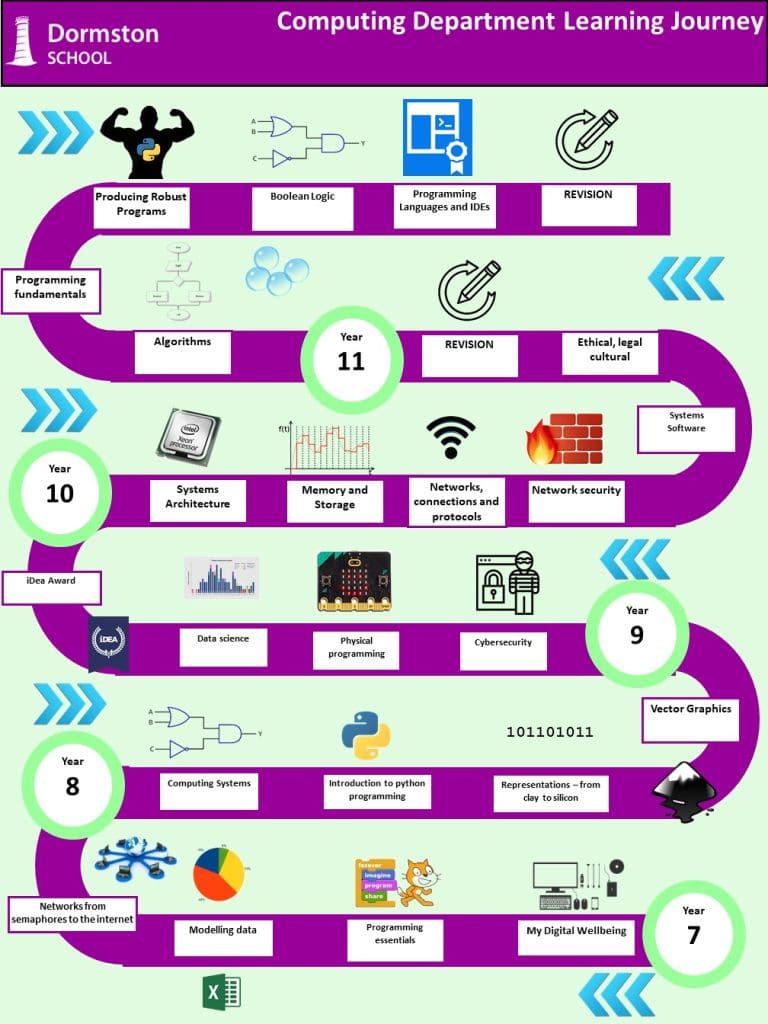
In Key Stage 3, pupils are taught a wide range of topics which cover the three main strands of Digital Literacy, Information Technology and Computer Science. As part of a 5-year curriculum, elements of GCSE Computer Science are introduced as early as Year 7 to stretch and challenge pupils. The scheme of work uses units developed by the National Centre for Computing Education (NCCE)
KS4
Pupils who choose to study Computer Science at GCSE will build upon the skills and knowledge developed in Years 7,8 and 9. As pupils have been following the 5 year curriculum, the transition to GCSE from KS3 will be seamless. More challenge and GCSE aspects has been introduced at an earlier stage that helps our pupils prepare for their Computer Science qualification.
How we assess
Key stage 3
Formative assessments are conducted at the mid-point and end of each unit. These assessments are marked and feedback given to pupils to help guide pupils to improve. Teachers are then adaptive on planning subsequent “DO IT NOW!” activities to address common misconceptions.
As Computing is a variety of academic and practical units, a lot of feedback given to pupils is verbal and ad-hoc, allowing pupils to make rapid progress.
Summary of each unit with links to next steps for parents
Year 7
Unit | Topic | Link |
7.1 – My Digital Wellbeing | Content | |
Text | PowerPoint Tips: Simple Rules for Better PowerPoint Presentations | |
Images | ||
Speaker Notes | Adding and Formatting Speaker Notes to a Presentation in PowerPoint 2021/365 – YouTube | |
Formatting | ||
7.2 – Scratch | Selection | |
Iteration | ||
Variables | ||
Broadcasts | ||
Operators | ||
7.3 – Spreadsheets | Basic Formulae | |
Basic Functions | ||
Advanced Functions | ||
Conditional Formatting | Applying conditional formatting to data | Oak National Academy | |
Charts | ||
7.4 – Networks | Local networks and their components. | |
How devices on a computer network use protocols to communicate. | ||
Wired and wireless networks | ||
The internet | ||
Internet of Things | ||
Exploring the World Wide Web (WWW) |
Year 8
Unit | Topic | Link |
8.1 – Computer Systems | Inside a computer | |
Input and output devices | Computer devices – Digital devices – KS3 Computer Science Revision – BBC Bitesize | |
RAM and ROM | Primary storage – Memory and storage – OCR – GCSE Computer Science Revision – OCR – BBC Bitesize | |
Secondary Storage | Secondary storage – Memory and storage – OCR – GCSE Computer Science Revision – OCR – BBC Bitesize | |
The CPU | ||
8.2 – Python Programming | Sequencing | |
Variables, Arithmetic Operators, Comparison Operators | ||
Selection | ||
Iteration | ||
8.3 – Data Representation | Binary Conversion | |
Binary Addition | ||
Images | Images – Units and data representation – OCR – GCSE Computer Science Revision – OCR – BBC Bitesize | |
Logic Gates | AND gates – Boolean logic – OCR – GCSE Computer Science Revision – OCR – BBC Bitesize |
Year 9
Unit | Topic | Link |
9.1 – Cyber Security | Protecting Personal data | |
Social Engineering | ||
Hacking and Brute Force Attacks | ||
Malicious Software | ||
Protecting networks from security threats | Protecting networks from security threats | Oak National Academy | |
Preventing cyber attacks | ||
9.2 – Physical Programming | Introduction lesson | |
Explore micro:bit hardware components | ||
Microbit Projects | ||
9.3 – Data Science | Introduction to Data Science and Visualising Data | |
Global Data | ||
The Investigative Cycle | ||
Data Cleansing |
Key stage 4
Similar to Key stage 3, formal assessments take place at the end of each unit, however pupils conduct detailed, forensic question level analysis to help identify their areas for improvement. For each unit of work, pupils complete a PowerPoint “workbook” is developed to be used as a Knowledge Organiser when preparing for further assessments and exams. Again, like Key Stage 3, there is a lot of verbal feedback given during practical elements and pupils are encouraged to self-assess their work to help identify next steps.
Subject specific websites to support independent learning and revision
Key Stage 3
Oak Academy – Computing lessons for Key Stage 3 students – Oak National Academy (thenational.academy)
BBC Bitesize – KS3 Computer Science – BBC Bitesize
Scratch – Scratch – Imagine, Program, Share (mit.edu)
Repl.it online coding environment – Home – Replit
BBC Click YouTube Channel – BBC Click – YouTube
Key Stage 4
Craig n Dave YouTube Channel – Craig’n’Dave – YouTube
BBC Click YouTube Channel – BBC Click – YouTube
BBC Bitesize – GCSE Computer Science – OCR – BBC Bitesize
Seneca Learning – Free Homework & Revision for A Level, GCSE, KS3 & KS2 (senecalearning.com)
Repl.it online coding environment – Home – Replit
Trips & Visits
Previous school trips have included looking at control systems at Alton Towers and code breaking at Bletchley Park.
Our Knowledge Organisers
Key Stage 3
As this is a brand new scheme of work, these are currently being produced and will be uploaded as soon as they are complete
Key Stage 4
Pupils use their completed PowerPoint workbooks as knowledge organisers. In addition to this, CGP Revision guides are provided for pupils when possible.
Non-Required Work
Non-required work in Computing/Business can be found on Go4Schools. This will be set as an ongoing homework task throughout the academic year and will reflect the units studies by that year group.

It is an innovative subject designed to challenge and inspire pupils to think logically, critically and creatively to solve problems.